Giving AI Memory
You learned in the previous section that AI has limited memory: it forgets everything between conversations. That is a problem when you need consistency across a project, a team, or an organization.
The Two Ways to Brief a House-Sitter
Imagine you are going on a two-week vacation. One friend is house-sitting for the first week, and a different friend is covering the second week. Neither has house-sat for you before.
Option A: Call friend one when they arrive and explain everything: the alarm code, when the dog gets walked, where things are. Then call friend two a week later and explain all of it again.
Option B: Leave a note on the kitchen counter. Both friends read the same note when they arrive.
Option A is what it means for AI to be stateless. Every new conversation is a new house-sitter showing up with no note. You re-explain everything, every time.
Option B is the way around it. You write a note once, update it as the project evolves, and AI reads it automatically at the start of every conversation.
The Problem Without the Note
Without that note, every AI conversation starts with no knowledge of:
- What your project is
- Who it serves
- What standards your organization follows
- What decisions have already been made
- What constraints apply
Your teams end up re-explaining the same context over and over, and different team members explain it differently. The variation in AI's output is not coming from AI. It is coming from inconsistent inputs.
The Solution: Context Files
A context file is a document that tells AI everything it needs to know about your project. You create it once, update it as the project evolves, and AI reads it at the start of every conversation.
What goes in a context file:
- What the project is. A brief description of what you are building and why.
- Who it serves. The users, their needs, and the outcomes you are targeting.
- Key constraints. Technology choices, regulatory requirements, accessibility standards, timeline.
- Standards. Naming conventions, coding patterns, documentation requirements, security policies.
- Decisions already made. Architecture choices, approved vendors, scope boundaries.
- Domain context. Vocabulary, concepts, and rules specific to your mission area, especially in specialized or classified domains where AI has less to draw from.
The Table of Contents, Not the Binder
Back to the house-sitter. You could drop off a 200-page binder covering every possible scenario: garbage schedule, dog feeding, what to do if the internet goes out. Every detail documented, with no way to find anything quickly.
Your house-sitter would be overwhelmed and stop reading halfway through. AI works the same way. Remember the oxygen tank from the previous section: everything in the context file takes up space in AI's working memory.
The better approach: one page on the counter that covers the essentials and tells them where to find deeper details. "Appliance manuals are in the file cabinet. The vet's number is on the fridge."
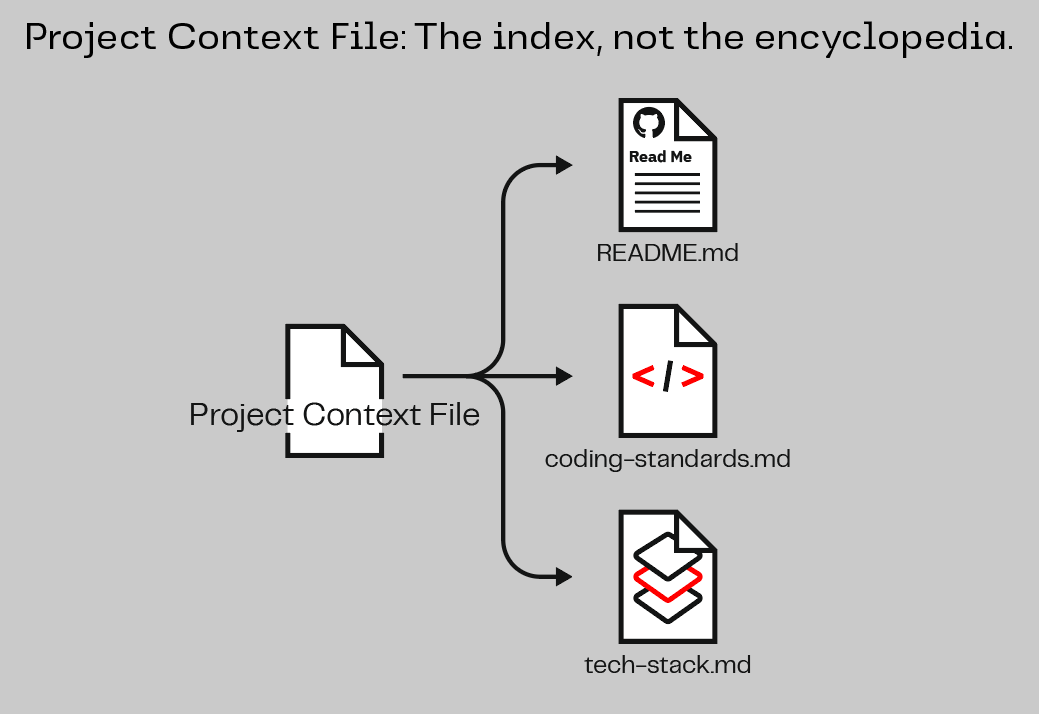
Your context file is that table of contents. It gives AI the essentials and points to where deeper information lives. If your project already has documentation, your context file should point to it, not copy it. This keeps the file short and preserves the oxygen tank for the actual conversation.
In Your AI Assistant
You do not need to create context files by hand. You can ask your AI assistant to do it:
Create a project context file for this project. Include:

- What the project is and who it serves
- The main parts of the application and what each part does
- Key domain concepts and vocabulary
- Standards and constraints the project must follow
- Any decisions that have already been made

Keep it short. Point to existing documentation rather than
duplicating content. This should be a table of contents,
not the whole book.
Your AI assistant will create an AGENTS.md file in the project root. Every new conversation will read it automatically. AGENTS.md is an open standard that works across multiple AI coding tools.
You can also refine the context file iteratively: ask your assistant what it knows about the project, tell it what is missing, and have it update the file.
You do not need to create context files by hand. You can ask your AI assistant to do it:
Create a project context file for this project. Include:

- What the project is and who it serves
- The main parts of the application and what each part does
- Key domain concepts and vocabulary
- Standards and constraints the project must follow
- Any decisions that have already been made

Keep it short. Point to existing documentation rather than
duplicating content. This should be a table of contents,
not the whole book.
Your AI assistant will create the right file, name it correctly, and place it where it needs to go. Every new conversation will read it automatically.
You can also refine the context file iteratively: ask your assistant what it knows about the project, tell it what is missing, and have it update the file.
You do not need to create context files by hand. You can ask your AI assistant to do it:
Create a project context file for this project. Include:

- What the project is and who it serves
- The main parts of the application and what each part does
- Key domain concepts and vocabulary
- Standards and constraints the project must follow
- Any decisions that have already been made

Keep it short. Point to existing documentation rather than
duplicating content. This should be a table of contents,
not the whole book.
Your AI assistant will create an ANTIGRAVITY.md file in the project root. Every new conversation will read it automatically. You can also run /init to generate a starter context file. The @file.md import syntax lets you modularly include other files, keeping your main context file short while pointing to deeper documentation.
You can also refine the context file iteratively: ask your assistant what it knows about the project, tell it what is missing, and have it update the file.
You do not need to create context files by hand. You can ask your AI assistant to do it:
Create a project context file for this project. Include:

- What the project is and who it serves
- The main parts of the application and what each part does
- Key domain concepts and vocabulary
- Standards and constraints the project must follow
- Any decisions that have already been made

Keep it short. Point to existing documentation rather than
duplicating content. This should be a table of contents,
not the whole book.
Your AI assistant will create an AGENTS.md file in the project root. Every new conversation will read it automatically. AGENTS.md is an open standard shared across tools like Codex, Open Code, Cursor, and others. You can also run /init to generate a starter AGENTS.md.
You can also refine the context file iteratively: ask your assistant what it knows about the project, tell it what is missing, and have it update the file.
Two Levels of Context
Context files work at two levels, and both matter:
Project-Level Context
This is specific to what your team is building right now: product description, user personas, technology stack, and current sprint goals. Every team member shares this file, so AI starts every conversation with the same understanding.
Organizational-Level Context
Context can also be configured at the organizational level, flowing down to every project automatically. This is how you encode security requirements, approved technology lists, compliance constraints, and communication standards into every AI session without relying on individuals to remember them.
In Your AI Assistant
Where do context files live?
- Project-level context lives in
AGENTS.mdat the root of your project. Open Code reads it at the start of every conversation about that project. - Organizational-level context can be configured in
~/.config/opencode/so it flows down to all projects. You will not set this up in the lab, but the capability exists for scaling AI adoption across teams.
Where do context files live?
- Project-level context lives in the root of your project. Your AI assistant reads it at the start of every conversation about that project.
- Organizational-level context can be configured at a higher level so it flows down to all projects. You will not set this up in the lab, but the capability exists for scaling AI adoption across teams.
Where do context files live?
- Project-level context lives in
ANTIGRAVITY.mdat the root of your project. Antigravity CLI reads it at the start of every conversation about that project. - Organizational-level context can be configured in
~/.gemini/antigravity-cli/so it flows down to all projects. You will not set this up in the lab, but the capability exists for scaling AI adoption across teams.
Where do context files live?
- Project-level context lives in
AGENTS.mdat the root of your project. Codex CLI reads it at the start of every conversation about that project. - Organizational-level context lives in
~/.codex/AGENTS.mdso it flows down to all projects. You will not set this up in the lab, but the capability exists for scaling AI adoption across teams.
Discussion: What Would You Encode?
Team Discussion | ~3 minutes total | Discuss at your table.
Think about the organization you work in today. If every AI session across your organization started with the same baseline context, what would you want in it? Security requirements? Approved technology lists? Compliance constraints? Communication standards? Domain vocabulary?
This is something to think about as you go back to your organization. Deciding what goes into organizational context is a policy decision, not a technical one.
Key Insight
Context files are the second guardrail you are learning today: manufacturing findable context so that AI works within your standards by default, not by accident. You will create a project context file during the Challenge. The organizational layer is something to take with you: who owns it, what goes in it, and how do you govern it across your organization?